Customer operations platform · for law firms & professional services

The work between conversations.

A conversation with a client ends. The work it created is just starting — the intake to record, the consultation to schedule, the confirmation to send, the calendar to keep straight, the follow-up nobody has time for. GuideHerd runs that work, so your people can spend their attention on the next conversation instead of the paperwork from the last one.

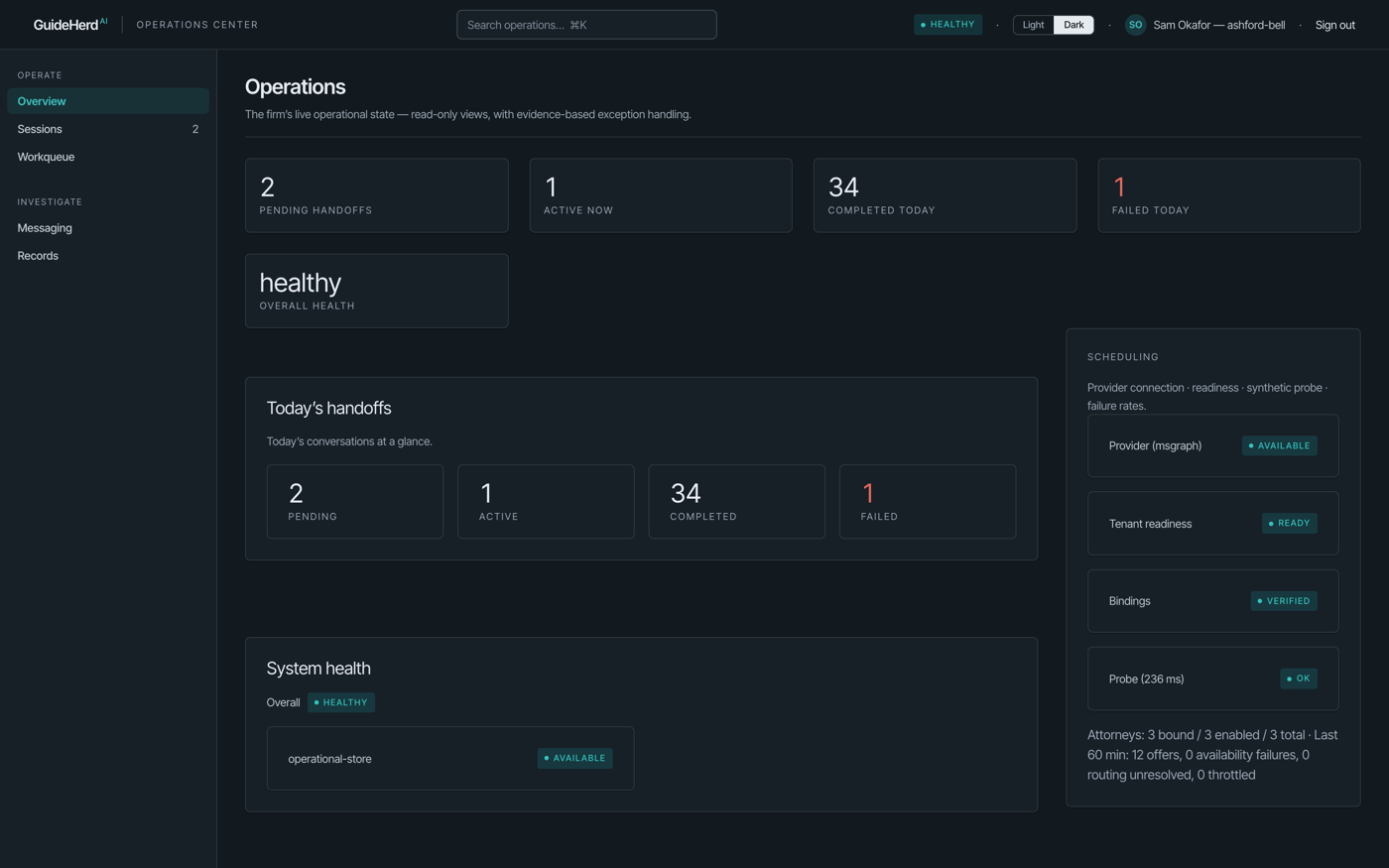
The GuideHerd Operations Center in dark mode: today's handoffs as counts, scheduling readiness, and system health, populated with fictional sample data.
Operations Center · real product, fictional sample firm
Prepared handoff Consultation scheduling Microsoft 365 and Google calendars Confirmation emails Cancel & reschedule Operations Center Administration Center Audit history Prepared handoff Consultation scheduling Microsoft 365 and Google calendars Confirmation emails Cancel & reschedule Operations Center

Why firms can do this now.

Nothing about the work has changed. What changed is that the calendar, the mailbox, and the appointment can now sit in one connected environment instead of three. GuideHerd connects to Microsoft 365, so for a firm already running there it reads real availability from the attorneys’ own calendars, creates the appointment on those calendars, and sends the confirmation from the firm’s own mailbox. There is no parallel calendar for the office to keep in sync, and nothing for your team to copy across.

Every conversation leaves work behind.

Somebody wrote the caller’s details on a pad. Somebody else checked whether the attorney was free, typed the appointment into a calendar, sent a confirmation, and made a note to follow up. None of that is legal work. All of it has to happen, in order, every time.

It is also where things quietly go wrong — the double-booking, the confirmation that never went out, the caller who was told someone would ring back. The cost is not one dramatic failure. It is the steady tax of coordination, paid by whoever happens to be at the desk.

GuideHerd takes that work as its job. One conversation ends; the platform records what was said, offers real times from the right attorney’s calendar, books it, confirms it, gives the client a way to change it, and keeps a record of all of it. Your team stays in charge and stays informed — they simply stop being the integration between one step and the next.

What your firm stops doing by hand.

A

From the call to the calendar, without another handoff.

From the moment a caller is on the line to the moment the consultation is on the right calendar — and afterwards, when they need to move it.

  • Receptionist-assisted workflowsA person, supported
  • Prepared caller handoffContext travels with the caller
  • Consultation schedulingReal availability
  • Microsoft 365 calendar integrationOutlook · Exchange Online
  • Google Calendar integrationGoogle Workspace · validated end to end
  • Confirmation emailsSent on booking
  • Appointment managementClient self-service link
  • Cancellation & reschedulingCalendar kept in step
  • Notification routingPer notification type
See what it costs
B

Every call, on the record.

The half most software skips: knowing what happened, changing how it works, and being able to undo it.

  • Operations CenterWhat happened, and when
  • Administration CenterConfigure without a ticket
  • Reception ConsoleThe desk-side surface
  • Audit historyWho changed what
  • Reversible configuration changesUndo a specific change
  • Provider capability managementTurn on deliberately
  • Provider access reportingScopes & credential state
  • Usage meteringPer firm, per month
How the platform earns trust

Reception, oversight, and the client’s own link.

Nobody at your firm should have to learn a platform. They should open the one screen their job needs.

Your receptionist stays in charge. GuideHerd carries the prepared information forward so the caller does not have to start over, and your firm can see what the system did — not just what it promised.

  1. 01

    Reception Console

    For whoever answers the phone. Capture the caller, the practice area, and the consultation type, then hand the call off with that context already attached — so the attorney is not asking the client to start over.

    Used byReception · intake staff
    ProducesA prepared handoff
  2. 02

    Operations Center

    For the person who has to answer “what happened with that caller?” A KPI strip of today’s handoffs, then the record behind it: sessions, notification deliveries, booking exceptions, and event history — searchable across all three, filterable, with column controls and CSV export, and scoped to your firm alone.

    Used byOffice managers · operations
    ProducesAn answer, with the record behind it
  3. 03

    Administration Center

    For the person who owns how it all works. Focused workspaces — setup, firm, scheduling, catalog, notifications, access — with settings search across all of them. Attorneys, practice areas, consultation types, office hours, notification routing, calendar bindings, and users: each change versioned, audited, and reversible on its own.

    Used byFirm administrators
    ProducesConfiguration you can change and undo
  4. 04

    And the client’s own page

    Your client gets a private link in their confirmation email. They can see the appointment, cancel it, or reschedule it themselves — and the calendar, the record, and your team’s view all stay in step without anyone re-keying anything. Firms can also choose to activate digital intake forms and secure document upload with malware scanning — both stay off until your firm turns them on.

    Used byYour clients
    ProducesFewer phone calls about phone calls

The product, as it ships.

These are real screens from the shipped product — not mockups — populated with a fictional sample firm. Every console runs dark by default, with a light theme one click away.

The GuideHerd sign-in page in dark mode: Continue with Microsoft, Continue with Google Workspace, or a firm-issued account with email and password.
Sign-in · Microsoft or Google Workspace, or a firm-issued account
The Administration Center catalog workspace in dark mode: KPI strip, practice areas and attorneys tables with filter, column, and export controls.
Administration Center · catalog workspace, dark (the default)
The same Administration Center catalog workspace in the light theme.
The same workspace in light — every console supports both

Sample data shown is fictional (“Ashford & Bell, LLP”); no client or customer information appears in product imagery.

Built for firms that have to be careful.

Client information is the most sensitive thing your firm holds. These are properties of the platform, not promises about it.

§

Every action has a name and a time.

  • Audit history on every changeWho, what, when
  • Reversible configurationUndo one change, not the day
  • Operational transparencyDelivery & exception records
  • Usage meteringCounts you can reconcile
§

A failure stops the workflow instead of inventing an answer.

  • Tenant isolationYour firm’s data, only yours
  • Configuration managementCredentials by name, never on screen
  • Provider access reportingWhat is connected, and with what access
  • Capabilities off until enabledNothing turns itself on
Who gets in, and how Staff sign in with Microsoft or Google Workspace, or with firm-issued accounts protected by verification codes. Each person lands in the workspace their role allows — reception, operations, or administration.
Human-first by design GuideHerd prepares the work and keeps the record. Your people talk to your clients and make the decisions — the platform never speaks for the firm.

Integrations, stated plainly.

Connected

Microsoft 365

GuideHerd reads real availability from your attorneys’ own calendars and writes appointments back to them. No parallel calendar to keep in sync, and nothing for your team to copy across.

  • Microsoft 365
  • Microsoft Graph
  • Outlook
  • Exchange Online
Stated per system

Practice management

Each system is labelled with where it actually stands today. We would rather tell you now than let you find out during onboarding — ask us before you plan around any of them.

  • Clio — connected; live-validated with a real firm, and disconnectable by the firm at any time
  • Orion — in active development; reading live firm data today
  • Filevine — in active development; sign-in shipped
  • Anything else — planned means planned
How we handle this

Ask before you plan around it

Two rules we hold ourselves to. A firm should never discover during onboarding that something it counted on is a roadmap item, and no connection is ever made quietly.

  • Planned is labelled planned, on every page
  • Every provider stays off until your firm enables it
  • The access granted is visible to you afterwards
  • Ask us where any integration stands — we will tell you

GuideHerd Success.

Software that changes how a firm works needs someone on the other end of it. GuideHerd Success is an ongoing subscription — not a one-time training session — for the questions that come up in month seven as much as in week one.

1

Getting people running

  • Onboarding new staffWhenever you hire
  • Administrator trainingThe person who owns setup
  • Best practicesWhat works at other firms
  • Adoption of new capabilitiesAs the platform grows
2

Keeping it configured

  • Workflow configurationHow your firm actually works
  • Provider configurationConnections & capabilities
  • Microsoft 365 integration guidanceWith your IT, not around them
  • Adding attorneys & practice areasAs the firm changes
Why it is a subscription Firms change — a new associate, a new practice area, a new office. The configuration has to change with them, and a one-time handover cannot do that.
See GuideHerd Success →

Platform, and a partnership.

Two things, priced separately and honestly: the software that runs the work between conversations, and the people who help your firm keep it configured as the firm changes.

What you are buying The platform, your Microsoft 365 connection, the three consoles, and GuideHerd Success alongside them.
See platform pricing →

See GuideHerd in action.

Half an hour, walked through end to end: a caller arrives, the consultation gets booked on a real Outlook calendar, the confirmation goes out, and the client reschedules it themselves — with the record of all of it in the Operations Center. Then an honest conversation about whether your firm is a fit.

  • A working walkthrough, not a slide deck
  • Your Microsoft 365 setup discussed specifically
  • Straight answers on what is planned versus available
  • No obligation, and no pressure to decide on the call

Email us — a person replies.

No form, no ticket queue. Write to [email protected] and it lands with someone who can actually schedule the walkthrough.

Helpful to include, if you have it handy: your firm’s name, your role, whether you run on Microsoft 365, and a sentence about what happens after a call comes in today.

Email [email protected]

We reply within two business days. We do not sell or share your information, ever.